

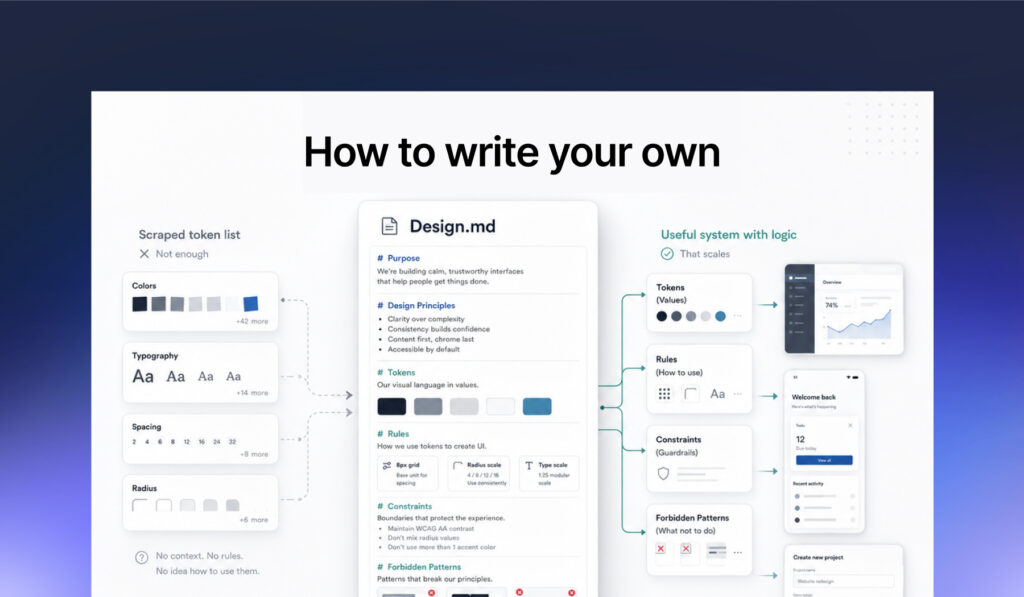
Design.md is everywhere lately. Tutorials, GitHub repos, AI design threads. Most of what you read makes it sound like a magic file you can download and ship. It is not, but it can be genuinely useful if you write your own. So what is it, exactly, and is it worth the noise?
A Design.md is a single markdown file that describes a product’s visual system in a format an AI agent can read. Drop it into Claude Design, Cursor, Claude Code, Google Stitch, or any modern AI tool, and every screen the tool generates is supposed to follow your system.
Design.md is not really a new idea as much as a clearer container for something designers were already doing: writing design briefs for AI tools so the output had a better chance of staying on-system. Product context, visual direction, tone, constraints, examples, and “please do not do this” lists were already part of the work. Design.md turns that loose AI design brief into a reusable reference file that can travel between tools and conversations.
Google Labs open-sourced the format earlier this year. Claude Design launched in April and the format became mainstream. Then GitHub repositories full of scraped Design.md files appeared, pitching brand-name shortcuts: download Airbnb’s Design.md, drop it into Claude, ship something that looks like Airbnb made it.
It does not work like that. And the reason it does not is interesting, because it is the same reason a lot of AI work falls apart in real use.
What a Design.md is actually for
The problem it solves is small but constant. Every AI tool has the memory of a goldfish. You describe your colors in a prompt, you generate a button, you ask for a card, and the spacing and weights have already drifted. By the third screen you are in someone else’s product.
A Design.md fixes that by giving the agent a persistent reference. Tokens are for the machine: exact values it can apply without ambiguity. Prose is for the decisions the machine cannot infer from a hex code.
That second half is where most files quietly fail.
Why scraped Design.md files do not work
The scraped repos are the most visible thing in this space right now. They are also the clearest illustration of the underlying problem.
A scraped file lists the CSS values of a website you admired. You get the hex codes, the font names, the border radii, maybe a paragraph of generic philosophy bolted on top. What you do not get is anything that explains:
- Why that brand makes the design choices it makes
- How to choose which components and elements to use in different flows
- When to use the existing set of components and when to create new
- How to drive visual consistency or decrease cognitive load
- Why that editorial product uses one large display weight and forbids the others
- When a button is allowed to be primary, and when it has to be demoted to secondary, tertiary or text-only
Without that, the AI has values without rules. It knows what colors exist. It does not know which one to pick, which one to never pick, or what to do when none of them fits the situation in front of it. So it guesses. And the moment it guesses, you are no longer using a system. You are looking at a confident, coherent screen that is subtly off-brand from the one next to it.
This is the AI version of a problem we already know in design. A design system is not its tokens. A design system is the set of decisions that produced those tokens, and the rules that govern when each one is allowed.
A scraped Design.md gives you the what without the why. AI tools are good at applying the what. They are bad at inferring the why on their own.
5 reasons it is worth writing one yourself
If you write your own Design.md, and you write it with intent rather than as a token dump, you can get something real out of it
- One source of truth across every AI tool. Drop the same file into Claude, Cursor, or Stitch, and the agent stops hallucinating colors you do not own.
- Better decisions, not just better looks. When the rationale is in the file, the agent respects constraints like “this color is reserved for these actions” instead of using it decoratively.
- Faster iteration. Generating a new screen takes less time because the system context is already loaded. You stop re-explaining your brand in every prompt.
- Consistency across the team. Anyone prompting AI in your team gets outputs that look like they came from the same product. The Design.md is the alignment layer.
- It forces clarity in your own thinking. Writing why a token exists exposes gaps. You will discover rules you have been applying intuitively but never written down. Some of them will turn out to be wrong.
What separates a useful Design.md from a weak one
A weak Design.md lists what exists: colors, fonts, spacing, radii, components.
A useful Design.md explains how the system thinks.
Why does this token exist? When should it not be used? What should the product feel like? What patterns are we avoiding?
That does not make AI design output magically reliable. Nothing does right now. But it gives the agent a better starting point than a scraped list of values.
A simple test: if you removed the hex codes, would the file still teach someone how the product should feel and behave? If yes, it is probably doing something useful.
How to write a Design.md
A few principles I have landed on after writing Design.md files.
Start with audience, voice, and the feeling
Before any tokens, one short section that says what the product is, who it is for, and the feeling it should evoke. “Confident and calm, not playful.” “Nordic and modern, not loud.” This anchors every later choice. If a generated screen contradicts the feeling, you can point at the contradiction without arguing about hex codes.
Write rationale next to every token
Not just “spacing-xl: 128px” but: 128px is the breathing room between major sections. Never used inside a component or between siblings in a list. If two elements feel related, they belong within 32px of each other, not 128px.
That sentence does more work than every other line in the file. The agent reads it and respects the constraint. Without it, the agent treats the spacing as decoration available everywhere.
Use negative constraints generously
A “Forbidden patterns” section punches above its weight. “No glassmorphism. No gradient text. No font sizes below 16px if we can avoid it. No borders on cards.” Negative rules are surprisingly effective with AI tools because they close off the space the agent would otherwise wander into.
This is also the section where you encode the lessons of the legacy version. Every “do not do this” usually maps to something the previous version of the product did and you no longer want. Or they are hard-learned lessons of design practices and preferences you want to follow.
Ground the file in your design knowledge
The first Design.md I wrote for a client project was very basic. I had a Figma file with layouts, and quick notes to top it off. I used ChatGPT to write a clean file from that. But it was basically a list of design tokens.
The fix is unglamorous: walk through your Design.md properly. Take time to elaborate and explain. Find where there is drift in your consistent design system, and fix it. Verify your own stated rules against the choices you have made with the product, because designers are not always consistent even with their own design preferences, and we misremember our own systems all the time.
The mechanical part of this is worth automating. Pointing Claude at the Figma file to extract the tokens, count which values are actually in use, and surface the drift is much faster than reviewing manually frame by frame. The same goes for adding context: feed Claude the brief, the user research, the audit notes, and any documentation you already have, and the resulting file is sharper because the rationale has somewhere to come from. Manual work on the inventory is wasted effort. Manual work on the rationale is the whole point.
The lesson is uncomfortable but worth saying out loud: a Design.md is only as good as the truth it is grounded in. If you write it from a Figma file alone, you are writing a token list. If you write it based on proper documentation, and add to it your vision and insights, your project and client knowledge, and something of your design logic, preferences and best practices, you are writing a system. The trick is to explain enough for the AI to understand the system without turning the file into a second design manual.
Keep the file under 500 lines
Bloated files degrade AI performance. The agent has a context window, and if your Design.md eats half of it, there is less room for the actual task. A focused 400-line file with clear rules will usually outperforms an 800-line file that tries to document every edge case.
HOW TO: write a v0.1 Design.md
A practical recipe for getting started without overthinking it.
- Start with one paragraph on the product, the user, and the feeling. No tokens yet. If you cannot write this paragraph, you are not ready to write a Design.md.
- Audit your existing screens. Open the Figma file. Pick a representative set of frames. Note the colors actually in use, the radii actually in use, the shadows actually in use. Most products have far fewer values than designers think. The system is hiding inside the noise.
- Let Claude do the inventory. Point it at the Figma file and have it pull the colors, typography, spacing, and existing components. Manual counting is a waste of your time, and Claude is faster and more thorough than you will be at three in the afternoon.
- Add the rationale on top. For each token and each component, write its job and its “do not” rules. Skip the components you have not built yet. The Design.md describes what exists, not what you wish existed.
- Write the forbidden patterns list. This is the most important section. It is also the easiest to write because you already know what you hate.
That gets you a usable v0.1 fast.
Treat it as a living document
After v0.1, generate some screens. Note where the output drifts from your intent. The drift tells you which rules are missing or weak. Tighten those, regenerate, repeat. The file improves if you actually use it.
Design.md or a Claude Skill?
If you work mostly in Claude, you have probably heard about Skills. They cover similar territory, so it is worth knowing the difference.
A Skill is a folder. The entry point is a SKILL.md with a short description at the top that tells Claude when to use it. Below that, the folder can hold anything: design tokens, rationale, voice guides, examples, component documentation. Claude only loads the parts it needs for the current task. That is real progressive disclosure, and it keeps the context window lean even when the system is large.
A Design.md is a single flat file. It loads in full. No structure, no on-demand pieces. The whole point is that any AI tool can read it: Claude, Cursor, Stitch, Figma Make, whatever comes next month.
The trade-off is portability versus depth.
Should Claude-users skip Design.md and only use Skills?
If you work exclusively in Claude, technically yes, a Skill is the more powerful tool. But there are real reasons Claude users still write Design.md files:
It is faster to start with.
A Design.md is one file. You write it, you save it, you drop it into a Claude project or attach it to a conversation. A Skill is a folder with structured metadata at the top of the entry file, sub-files Claude loads on demand, and conventions you need to follow. There is real setup work before you can use it. For a small or new design system, that setup might not be worth it.
It’s easier to share
A Design.md is one markdown file. You can send it to another designer, paste it into Slack, publish it in a blog, or use it across different AI tools. A Skill is also shareable, and often shared as a GitHub repo, but it takes a bit more setup, especially for a non-developer.
Other people on your team might not use Claude.
Even if you do, the marketing person next to you might use Stitch. A Design.md serves them too.
It is a useful artefact in its own right.
Writing a Design.md forces you to think through your system. The output is valuable to humans, not just AI. A Skill is more of an internal Claude mechanism.
So even Claude-heavy teams often have Design.md files. Not because Skills cannot do the job, but because Design.md is a lighter, more portable, more human-readable format.
When to use which
| Use a Design.md when… | Use a Skill when… |
|---|---|
| You want one file you can drop into any AI tool | You are working primarily in Claude (Code, Design, claude.ai) |
| The system is small enough to fit in one document | The system is large enough that loading all of it bloats context |
| You want every AI tool to start from the same design rules | You want Claude to load brand context only when the task calls for it |
| You want non-tech people to be able to easily read and edit it | You are comfortable with folder structures and YAML front matter |
| The team uses many AI tools, not just Claude | The team has standardised on Claude |
NOTE: The two are not mutually exclusive. A Design.md can live inside a Skill folder. Or a team might have both: a full Skill that holds the design system, examples, and supporting documents, and a Design.md as a portable summary that other tools can read. Use what fits the team. The point is not to pick a winner, it is to give the AI a reliable reference.
How Design.md fits with the rest of the design system
A Design.md is not a replacement for your design files or your component library. It complements them. The design files stay the canonical visual truth. The component library stays the implementation. The Design.md is the layer that explains the logic of the system to the AI, so the AI can extend the system to new screens without breaking that logic.
And it is worth saying out loud: markdown is not deterministic. The AI will follow your Design.md most of the time, and miss occasionally. It is 80-20. It is in the design and development team’s hands to make sure the final product is what it should be.
What Design.md is good for and what it is not
A Design.md is good for
- Prototyping new screens fast, on-system
- Aligning multiple people prompting AI tools to produce work that looks like it came from one product
- Encoding the legacy lessons your team has learned, so the AI does not reintroduce drift you already cleaned up
- Onboarding a new designer or developer to your visual logic in fifteen minutes
A Design.md is not good for
- Replacing your component library
- Making a brand-less product feel branded by copying someone else’s file
- Producing pixel-perfect production output from prompts alone (a girl can dream, though)
- Enforcing accessibility (the agent will follow your rules, but it will not catch every contrast failure; you still need a review)
The honest framing is that a good Design.md gets you to roughly 80 percent. The remaining 20 is judgment, refinement, and the kind of decision-making that does not compress into a markdown file. That last 20 is still a designer’s job.
The takeaway
Design.md is a small format with a useful pattern. The pattern is: write down the rules of your system in a way an AI agent can read, and the agent will follow them most of the time. The trap is thinking the format itself does the work. It does not. The work is in the rationale, the constraints, and the honesty about what your product actually looks like today.
If you write it well, an AI tool can extend your system to new screens without making them feel like a different product. If you just scrape another brand’s style into a design.md, you get some semi-coherent stranger pretending to be your brand.
Hype fades. The work of writing down what your system actually is, and why, does not.